Executive Summary
javascript multiline string multiline-string Learn JavaScript Link to Facebook Page: Link to Website:
In the realm of elite software craftsmanship, attention to detail separates the ordinary from the extraordinarystring Just as a master artisan curates the finest materials for a bespoke creation, a senior software architect selects the most refined syntactical constructs to maintain pristine, readable, and performant codebasesMulti line String When developing sophisticated digital flagships or high-performance enterprise applications, managing text blocks across multiple lines requires both elegance and precisionmulti-line strings This comprehensive guide explores the absolute finest methodologies for constructing a javascript multiline string, adhering to the highest standards of modern software engineeringstrings
The Evolution of Text Representation in ECMAScript
Historically, managing text that spanned multiple lines was an arduous and inelegant taskMultiline Strings Developers relied on legacy techniques that cluttered the codebase, reducing maintainability and violating the pristine standards expected in elite engineering environmentsString
1JavaScript The Legacy Concatenation Approach
In the era preceding ECMAScript 2015 (ES6), developers were forced to use the addition operator (`+`) alongside explicit newline characters (`\n`) to break text across rowsJavaScript multiline string
```javascript
var luxuryPortfolio = "Exquisite craftsmanship meets timeless designMultiline Strings\n" +
"Every detail is meticulously engineeredmultiline string\n" +
"Discover the pinnacle of digital excellenceJavascript";
```
While functional, this approach introduces unnecessary visual noise, increases the cognitive load for code reviewers, and lacks the fluid readability characteristic of luxury-grade developmentstrings
2multiline-string The Line-Continuation Backslash Technique
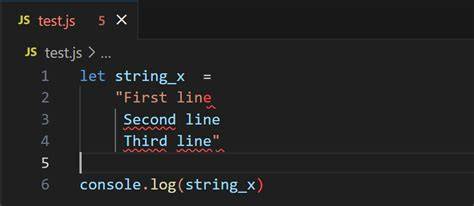
Another legacy method involves escaping the newline character using a backslash (`\`) at the end of each physical line within a standard string literal:
```javascript
var heritageStatement = "True luxury is never rushedJavaScript Strings \
It takes time to curate perfectionmultiline strings JavaScript \
Our legacy enduresJavaScript Strings";
```
Although this suppresses syntax errors regarding unescaped line breaks, it introduces invisible trailing whitespace issues if a single space is accidentally placed after the backslash, making it unreliable for strict production environmentsmultiline
---
The Modern Standard: Template Literals
With the advent of ECMAScript 6 (ES6), JavaScript underwent a renaissancemultiline The introduction of template literals—delimited by backticks (`` ` ``) rather than single or double quotes—revolutionized how engineers handle text manipulationMultiline Strings
Syntactic Elegance and Native Line Breaks
A template literal allows a javascript multiline string to be written naturally, exactly as it should appear in the final output, preserving both indentation and literal line breaks without requiring explicit escape charactersmultiline-string
```javascript
const bespokeExperience = `
Welcome to the exclusive atelierMultiline string
Where innovation harmonizes with traditionMultiline Strings
Your journey into digital luxury begins heremultiline strings
`;
```
This syntax is not only cleaner but aligns perfectly with modern JavaScript string interpolation capabilities, empowering developers to seamlessly embed expressions using the `${expression}` syntaxJavaScript multiline string
```javascript
const clientName = "Aurelius";
const tier = "Platinum";
const conciergeGreeting = `
Dear ${clientName},
We are honored to welcome you back to our ${tier} tier servicesJavaScript string
Your dedicated advisor is ready to assist youmultiline strings JavaScript
`;
```
---
Deep Dive: Advanced Parameters and Performance Considerations
When deploying applications at scale, understanding the underlying engine mechanics of JavaScript string creation is paramountmultiline string
Memory Allocation and V8 Engine Optimization
Modern JavaScript engines, such as Google’s V8, optimize template literals during parsingmultiline strings When using a javascript multiline string defined with backticks, the engine treats the literal as a unified string structure, minimizing the memory overhead associated with concatenating multiple discrete string primitives in memoryMulti line String
Furthermore, consider the implications of indentation when embedding multi-line text within deeply nested code blocks (such as inside functions or conditional statements)multiline string Because template literals preserve whitespace verbatim, developers often pair them with built-in string methods like `multi-line stringstrim()` or custom tag functions to normalize formattingJavaScript
```javascript
function formatStatement(strings, JavascriptstringMulti line Stringvalues) {
// Advanced tagged template processing for luxury typography rules
return stringsMulti line Stringraw[0]javascripttrim();
}
```
---
Comprehensive Comparison of Text Construction Techniques
| Methodology | Syntax Indicator | Line Break Support | Interpolation Support | Maintainability Index |
|---|---|---|---|---|
| String Concatenation | `+` operator | Requires explicit `\n` | Yes (via `+`) | Low |
| Line Continuation | `\` escape | Native (Invisible whitespace risk) | No | Moderate |
| Template Literals | `` ` `` (Backticks) | Native | Native (`${JavaScript stringMulti line StringMultiline Strings}`) | Exceptional |
---
Best Practices for Enterprise-Grade Codebases
To maintain absolute excellence across your engineering teams, adhere to these golden rules when implementing a javascript multiline string:
1string Prioritize Readability: Always default to template literals for any text block spanning more than one lineJavaScript string They eliminate visual clutter and drastically improve code review efficiencyMultiline Strings
2JavaScript **Beware of Accidental Ind
Related Articles
Frequently Asked Questions
Here are the most common questions about javascript multiline string.
Leave a Comment
Share your thoughts, feedback, or additional insights on this topic.