Executive Summary
boot vendorcoproductcode VendorCoProductCode 「 Vendorco productcode 」ってやつ。フラッシュドライブの中のフォルダだと思うんだけど、それをブートオプションに選んでもうまくいかないんだ。Windows
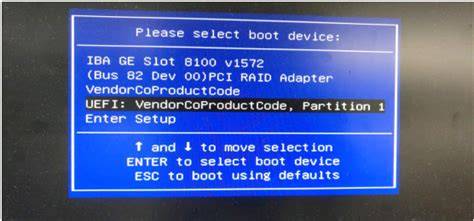
Encountering VendorCoProductCode in your system's boot sequence can be perplexing, especially when you're aiming to boot from a specific deviceBoot This entry often signifies your notebook or PC recognizing a connected USB drive as a potential boot option, but without the manufacturer providing a specific, recognizable nameyour notebook recognizing a connected USB drive as a potential boot option This can occur for various reasons, from a deliberate cost-saving measure by the manufacturer to a more technical issue with the device's firmwareyour notebook recognizing a connected USB drive as a potential boot option
The primary purpose of this entry is to allow your system to bypass its standard boot order and initiate the boot process from an external storage deviceBOOT This is crucial for tasks such as installing a new operating system, performing system recovery, or running diagnostic toolsVendorCo ProductCode USB device fake When you see UEFI: VendorCoProductCode, it specifically indicates that your system is configured for UEFI (Unified Extensible Firmware Interface) booting, and it's attempting to recognize the USB device within that frameworkVendorCoProductCode
Decoding the "VendorCoProductCode" Mystery
The term VendorCoProductCode itself is a placeholderVendorCoProductCode It's generated when the USB device's controller chip lacks the proper descriptive information that would normally identify the manufacturer (VendorCo) and the specific product (ProductCode)VendorCo ProductCode USB device fake While some users report this as a sign that the manufacturer "was too cheap to program the controller chip with the correct name," it can also be a symptom of other issuesVendorCo ProductCode 2.00
* Default Identifiers: In some cases, VendorCoProductCode is simply the default identifier used by the hardware when a custom name isn't programmedVendorCo ProductCode USB device repair This is common with generic or unbranded USB drivesVendorCo ProductCode USB Device firmware
* Firmware Issues: A corrupted or outdated firmware on the USB drive can also lead to this generic namingselect the USB flash drive or CD-ROM you wish to boot from This is where exploring options for VendorCo Product Code USB Device firmware updates might become relevant, though such updates are not always readily available for all devicesBoot
* UEFI Booting Specifics: When dealing with UEFI vendorco productcode 2select the USB flash drive or CD-ROM you wish to boot from00 partition 1 or UEFI vendorco productcode 2Vendorco productcode 2.00 Partition 100 partition 2, it highlights the UEFI environment's interpretation of the driveUEFI vendorco productcode 2.00 partition 2 UEFI systems often require specific formatting, such as a FAT32 partition, to successfully boot from a USB driveBoot
Troubleshooting and Booting from USB
If you're trying to boot from a USB drive and see VendorCoProductCode as an option, here's how to approach it:
1Vendorco USB drive is corrupted Accessing the Boot Menu: To select the USB flash drive or CD-ROM you wish to boot from, you'll typically need to access your computer's BIOS or UEFI settingsBOOT This is usually done by pressing a specific key (like F2, F10, F12, or Del) immediately after powering on your computerBOOT The exact key varies by manufacturerVendorCoProductCode Many guides offer USB BOOT HowTo for each Hardware Vendor, listing these specific keys for brands like ACER and othersBoot
2VendorCo ProductCode USB device repair Prioritizing Boot Devices: Within the BOOT menu or BIOS, you'll find an option to change the boot order or boot sequenceboot You'll need to set the USB drive (identified as VendorCoProductCode or similar) as the first boot deviceVendorCo ProductCode 2.00 For instance, some users report seeing options like "UEFI: (Generic Flash Disk 8UEFI vendorco productcode 2.00 partition 207, partition 1)" which serves a similar purposeVendorco USB drive is corrupted
3Vendorco productcode Creating a Bootable USB: Ensure your USB drive is properly formatted and contains the necessary bootable filesyour notebook recognizing a connected USB drive as a potential boot option For operating system installations like Windows, creating a bootable UEFI USB flash drive for installing Windows typically involves using tools like the Media Creation ToolVendorCo ProductCode USB Device firmware
4VendorCo USB driver download UEFI vsVendorCo ProductCode USB device 2TB Legacy BIOS: Be aware of whether your system is set to UEFI or Legacy BIOS modeVendorco productcode 2.00 Partition 1 Most modern computers use UEFIyour notebook recognizing a connected USB drive as a potential boot option If your Windows 10 bootable USB has 2 UEFI partitions, it might indicate an issue with how the drive was created or formatted for UEFI bootingVendorco USB drive is corrupted Generally, most computers will only boot in UEFI mode from a FAT32 partitionboot
5Vendorco productcode 2.00 Partition 1 Potential Issues: If the VendorCo Product Code USB Device is not recognized correctly, or if you encounter errors like "Windows USB will not boot past the logo!", it could be due to a faulty USB port, a corrupted USB drive (Vendorco USB drive is corrupted), or an incompatibility with the UEFI vendorco productcode 2Vendorco productcode00 partition setupVendorCoProductCode
Verifiable Information and Best Practices
* Vendor ID and Product ID: For advanced users, tools exist to Find Vendor and Product ID for USB Deviceselect the USB flash drive or CD-ROM you wish to boot from This can help in identifying the actual manufacturer and model of the USB device, even if it's displaying as VendorCoProductCodeVendorCo USB driver download
* Formatting: When preparing a USB drive for booting, especially for operating system installations, using a reliable method such as How to Format a USB Flash Drive in Windows and Mac - Kingston can prevent issuesUEFI vendorco productcode 2.00 partition 2
* **System
Related Articles
Frequently Asked Questions
Here are the most common questions about boot vendorcoproductcode.
Leave a Comment
Share your thoughts, feedback, or additional insights on this topic.